
How do I update my subscription shipping address?Updated 3 days ago
To update the shipping address for recurring subscription orders, you must edit the address within your subscription account. Please see the steps below:
1. Please log into your Orgain.com account, then click on Manage Subscriptions. OR you can log in to your subscription account directly here: |  |
| CAUTION! Do not click "Manage Shipping Addresses" to edit your subscription address. This will update your checkout shipping addresses only, NOT your subscription address. | |
To update the next subscription shipping address: 1. Navigate to the "Next Order" page 2. Scroll to "Shipping and Payment" below the order details 3. Click "Edit address" Note, this will update the address for the upcoming subscription, but not other active subscriptions. | 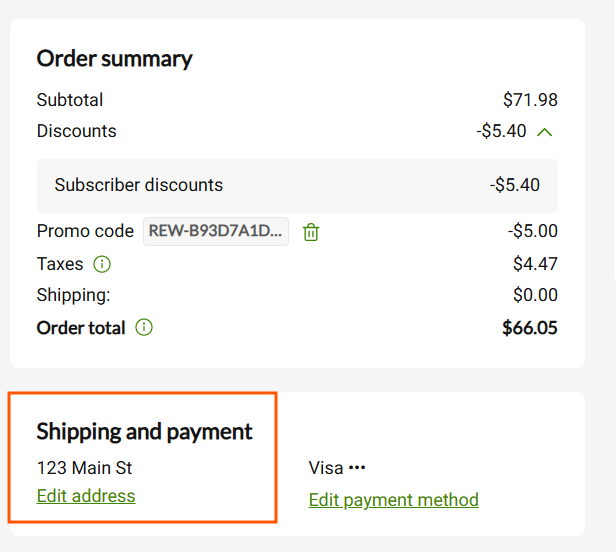 |
To update multiple subscription addresses: 1. Navigate to "My Details" and find your addresses 2. Click "Edit address" or "Add an address" 3. "Edit address" will update all subscriptions associated with that shipping address 4. "Add an address" will let you assign the address to all subscriptions, or keep the new address separate and manually assign subscriptions to the new address. | 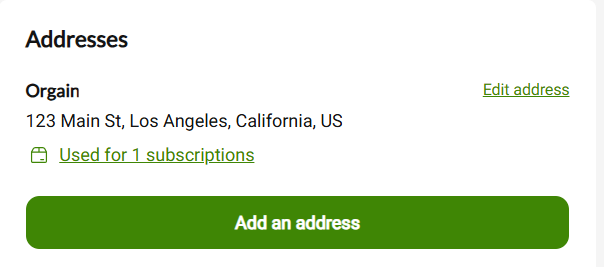 |